力法神奇马赛克
力法神奇马赛克是基于 Hekili 插件的 DPS 和坦克输出循环、减伤技能释放和增益药水使用的辅助教学工具。
安装
访问 Microsoft Store 进行安装。安装前联系力法并提供微软账号。
必要插件
力法神奇马赛克安装完成后需要安装 LifaMosaic 插件,联系力法获取插件。
自动更新 Hekili 和翻译 Hekili
力法神奇马赛克能够自动获取最新版本的 Hekili 插件以保证最优建议,设置好安装路径后即可自动安装升级 Hekili。更新后的 Hekili 是英文原版的,可以通过“翻译Hekili (预览)”按钮自动进行插件翻译。翻译功能是预览阶段,可能出现翻译后插件损坏的情况,如果出现这种情况,只需要删除 Hekili 插件后重启力法神奇马赛克自动重新安装即可。
Hekili 详细说明
以下内容来自 Hekili 官方 Wiki。
如何让插件建议某个技能
Warning
警告
The default priorities are imported from SimulationCraft profiles, meaning that they are tested in SimulationCraft to prove that they have optimal DPS benefit. Sometimes, this leads to behavior that appears different from what you may see in a class guide. These differences can occur for many reasons, some good and some bad. Before making changes to the addon priority, I strongly encourage you to make changes in your sim profile and test in multiple fight styles (Patchwerk, Hectic Add Cleave, DungeonSlice for some specs) so you’re aware of the benefits and risks before proceeding.
默认的优先级是从 SimulationCraft 导入的,这意味着其已在 SimulationCraft 被测试过并能证明其 DPS 收益是最佳的。有些时候,你可能会发现和某些职业指引上讲的不一样,这可能是多种原因导致的。在更改插件优先级之前,我强烈建议你先在你的 sim 配置中更改,然后在多种战斗场景下进行测试(Patchwerk*,Hectic Add Cleave**,DungeonSlice for some specs***),这样你就能在开始动手前清楚更改后的收益和风险。
* Patchwerk 是指挑战纳克萨玛斯的帕奇维克那种单目标站桩 BOSS 的战斗场景
** Hectic Add Cleave 是指挑战雷霆王座的赫利东那种能够召唤小怪 BOSS 的高压力多目标战斗场景
*** DungeonSlice 是指一次模拟多种战斗场景,包括单目标、多目标以及战斗间的无输出的情况,这更符合一次完整地下城活动的输出情况
With that said:
-
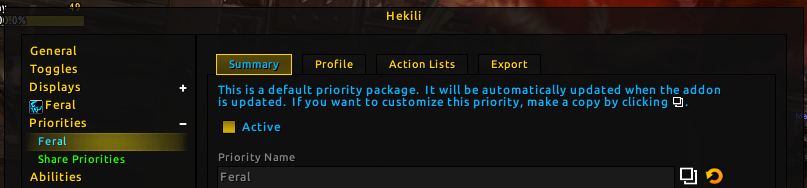
Make a copy of the default priority. If you edit a default priority (which will have its name in Blizzard blue), your changes will be overwritten the next time the default priority is updated. Click the Copy Priority icon, which is two overlapping squares to the right of the Priority Name field. Click Accept when asked whether to create a copy of this priority pack.
复制默认的优先级。如果你更改了默认的优先级(可以在 Blizzard blue 找到它的名字),在下一次更新默认的优先级时会被覆盖。点击优先级名称右侧的复制优先级图标(两个叠在一起的方块),当询问是否创建此优先级包的副本时点击接受。
-
On the Summary tab of your new priority, check Active to make this your new active priority for the listed Specialization.
在你新创建的规则的摘要标签中点击激活来对列出的专精生效。
-
Rename the new priority to something more meaningful. I’m renaming this to Feral with Regrowth. Press Enter or click Okay to save changes after providing a new name.
给新建的优先级设置一个更有意义的名字。我将其重命名为释放愈合的野德。按回车键或者点击确定保存新名称。
-
The Profile tab shows what was imported from SimulationCraft to build this priority. There are often notes about changes that were made to adjust the priority to work in-game. If you are well-versed in SimulationCraft conditional expressions, you could edit this profile directly and click Accept then Import to load changes all at once. This explanation will demonstrate the Action Lists section instead.
配置标签显示从 SimulationCraft 导入的用来生成此优先级的内容。其中通常包含针对最新游戏版本加以调整优先级的更新日志。如果你对 SimulationCraft 条件表达式非常精通,你可以直接对配置进行编辑,然后点击接受和导入按钮立即加载更改后的配置。更改后的配置会重建操作列表。
-
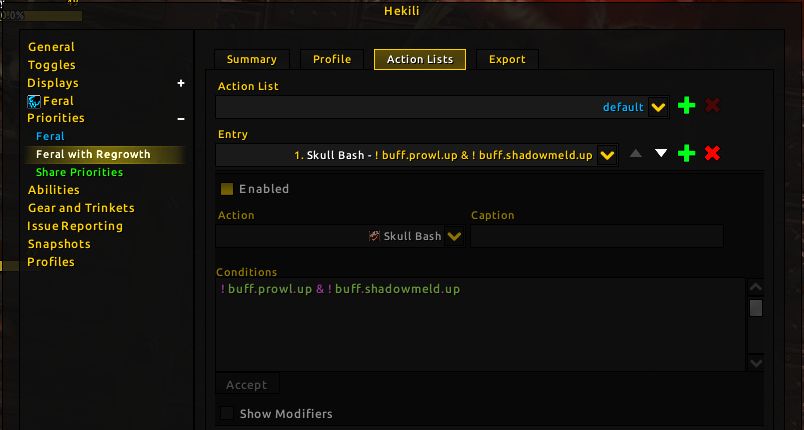
Click the Action Lists tab. You will be down the first entry in the default Action List. Both default and precombat are built in lists that the addon uses internally. Before combat, the addon will review precombat list for recommendations first, then move onto the default list and any additional lists that are run/called from there. In combat, the addon will mostly ignore the precombat list, unless there are essential abilities included – things like maintenance buffs that you wouldn’t want to drop during a raid fight and then leave off for the rest of the fight.
点击操作列表标签,你将会看到 default 操作列表入口。default 和 precombat 是插件内部使用的内置列表。开始战斗之前,插件会先查看 precombat 列表用以提供建议,之后当满足条件时再进入 default 列表和其他列表中查看。在战斗中,插件会几乎忽略 precombat 列表,除非其中包含必要的技能——如维护你不想在团本战斗中失去但在非战斗中又不希望存在的 buff。
-
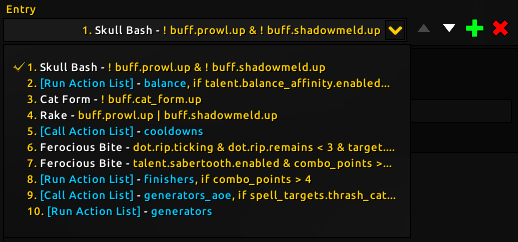
Clicking the Entry dropdown gives a high level overview of the current Action List.
点击条目下拉菜单会显示当前操作列表的高度概括。
When reviewing the action list entries, consider a few important details:
开始审查操作列表条目时,考虑如下重要信息:
-
Action Lists are a priority list, not a chronological list. That means the addon will provide the first recommendation that has its criteria met. It would be wrong to interpret the above image to mean: use Skull Bash, then use Cat Form, then use Rake, then use Ferocious Bite. It’s more accurate to say: If Skull Bash can be used and its conditions are met, use that. Otherwise, check the balance action list if its conditions are met. Otherwise, activate Cat Form if Cat Form is not activated. Otherwise, use Rake if you are in Prowl/Shadowmeld. Otherwise, go check the Cooldowns list.
操作列表是一个优先级列表,而不是一个时间轴列表。这意味着插件会优先提供符合标准的推荐。举一个更详细的例子:如果迎头痛击可以释放并且它也满足当前的推荐条件,就会被使用。否则,审查平衡操作列表查看其是否满足推荐条件。如果不满足,当猎豹形态没有激活时激活猎豹形态。如果已经激活了猎豹形态,当你处于潜行/影遁状体时释放斜掠。
- Conditions are similar to SimulationCraft, but sometimes adjusted to work in the language used by WoW addons (Lua). Use conditions from your existing priority for examples. Or refer to SimulationCraft wiki’s conditional expressions.
- [Call Action List] will switch to the referenced action list, returning to the current list and continuing on, if no recommendation was identified.
- [Run Action List] will switch to that action list and never return, meaning any actions after [Run Action List] in the priority will be ignored if the conditions for [Run Action List] were met. (That means, if you we add anything after entry 10, a [Run Action List] entry without any conditions, we will never reach that entry.)
-
-
In this example, we are wanting to add Regrowth to our priority, so that we make use of the healing potential in PvP. We will assume that this is for Shadowlands, where Regrowth no longer interacts with the Bloodtalons talent. We are also aware that the addon itself has some extra internal code that makes it so Regrowth will not be recommended in Cat Form unless it is instant cast (from Predatory Swiftness). Since the addon handles that bit, we don’t have to worry about it. However, we don’t want to be forcing ourselves to cast Regrowth when we’re not missing health.
-
Click the green plus sign next to the Entry dropdown.
-
Click the Up triangle to move the entry to position 8, placed before our finishers priority. I selected this position because using a 5 combo point finisher will result in proccing another Predatory Swiftness, so I am assuming that I want to use my Predatory Swiftness before that so it doesn’t go to waste.
-
Check Enabled.
-
In the Action dropdown, select Regrowth.
-
In the Conditions box, type
health.pct < 80– this expression means that your own health percentage is below 80%. You could use a different number or try other conditions. For instance,health.pct < 80 & fight_remains > 5means that your health percentage is below 80% and you’re expected to remain in combat for more than 5 additional seconds. You might not want to self-heal if you can just get the kill and get out of combat quickly.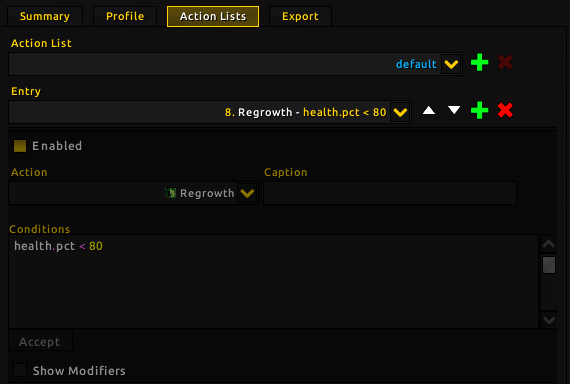
There are a few other fields here you can interact with. Caption, if your Displays are configured to Show Captions, will place the text you provided on the icon when this ability is recommended. This can be useful for live troubleshooting.
Show Modifiers allows you to access some additional options that are more advanced. Cycle Targets refers to swapping targets if this ability applies a debuff that you want to spread to multiple targets. It requires internal support (code) to work fo rany particular ability.
Check Movement allows you to specify whether you want the addon to be used only while stationary or moving.
Use Off Global Cooldown lets the entry be recommended during the GCD (if the ability is off GCD to begin with). Otherwise, the addon tends to line up abilities with the GCD, as this also results in less wasted buff/debuff uptime.
Use While Casting sets a particular ability to be recommended while casting another spell. For instance, a Fire Mage will Fire Blast during a Fireball cast. A Shadow Priest will use Searing Nightmare during Mind Sear.
-
Test it!
开始测试!
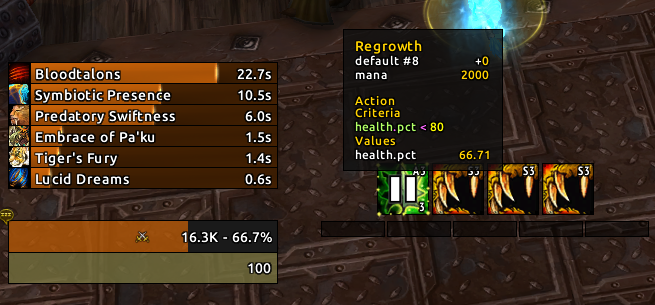
In the screenshot above, I have paused the addon while Regrowth is recommended in the first recommendation slot. (The default Pause keybind is ALT-SHIFT-P.) While paused, I can mouseover and see why the recommendations I’m shown have been shown.
开始使用
Bare Essentials
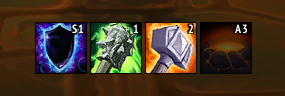
In the display above, the addon is recommending your next four abilities in combat. In the case of this Enhancement Shaman, that is Lightning Shield, Rockbiter, Flametongue, and Sundering.
Positioning
To reposition your displays, open the /hekili interface. You can move the configuration interface out of the way and click and drag the displays where you want them on your screen.
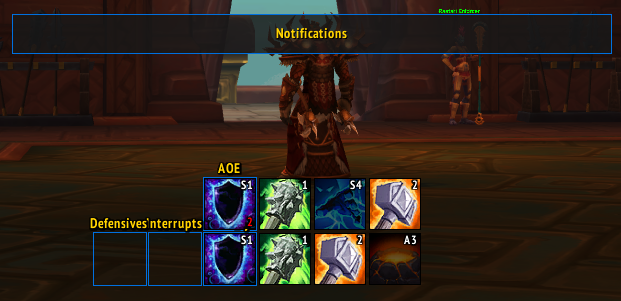
You can also adjust positioning, number of icons, size, spacing, keybindings, borders, visibility, and glow effects in the Displays section. Each display (Primary, AOE, Defensives, Interrupts) can be configured independently. The Notification panel has its own settings, and is where notification text appears when you toggle a feature on or off.
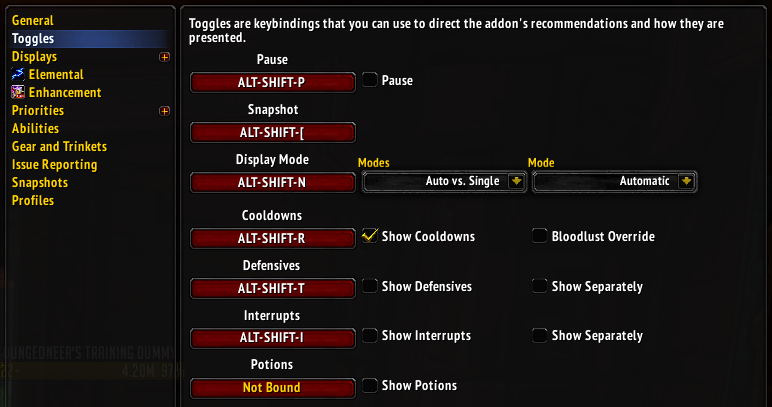
Toggles: Display Mode
The addon’s default mode is to show you the Primary display, which will automatically adjust itself based on the number of enemies detected and other factors. This is called “Automatic” mode and it generally works for most people. However, sometimes you may want single-target recommendations despite there being multiple enemies, or you might want multi-target recommendations even before multiple enemies have been detected. You can tell the addon what you want it to show you using the Mode toggle, which is ALT-SHIFT-N by default. This setting is found in /hekili > Toggles.
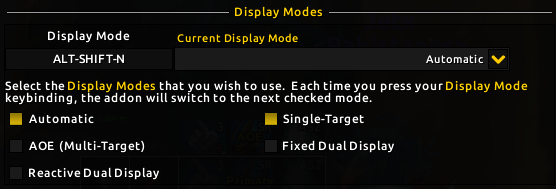
The Display Mode toggle has two components. You have the toggle keybind to cycle through the modes you like to use, and a series of checkboxes to identify your preferred modes.
- Automatic is the default, as described above.
- Single-Target will cause the Primary display to act as though there is only 1 target, even if multiple are detected. This mode is useful if a boss has a bunch of adds that you can ignore while you focus on burning down your target.
- AOE (Multi-Target) will cause the Primary display to act as though there are multiple targets, even if only one was detected. This can be useful when playing a ranged specialization and there are distant targets that you have not yet injured.
- Fixed Dual Display will cause the addon to show both the Primary display and the AOE display at all times. The Primary display provides single-target recommendations, while the AOE display provides multi-target recommendations.
- Reactive Dual Display will cause the addon to show single-target recommendations in the Primary display. When additional targets are detected, the AOE display will also appear to provide multi-target recommendations.
Toggles: Cooldowns, Interrupts, Potions, and Defensives
By default, the addon does not show your damage cooldowns, interrupts, potions, or defensive abilities. You can use a keybinding to toggle these on/off. The defaults are:
- Cooldowns:
ALT-SHIFT-R - Interrupts:
ALT-SHIFT-I - Defensives:
ALT-SHIFT-T - Potions:
NOT BOUND
When a toggle is turned off, any abilities in that category will be disabled. For example, the Cooldowns toggle lets you turn off recommendations for your big damage cooldowns until you toggle them back on. This is useful because sometimes you are saving cooldowns for a specific phase of a boss fight, or you may simply wish to manage cooldown usage on your own.
For Interrupts and Defensives, you can check Show Separately on the /hekili > Toggles section in order to have those recommendations appear in their own displays rather than mixed into the Primary or AOE displays.
哪些专精运行得最好?
The short answer…
简洁的回答是……
DPS
| Tier 梯队 |
Specializations 专精 |
|---|---|
| S | Feral, Retribution, Enhancement, Outlaw, Fury 野德,惩戒骑,增强萨,狂徒贼,狂暴战 |
| A | Frost DK, Havoc, Beast Mastery*, Windwalker, Assassination, Subtlety, Affliction*, Arms 冰 DK,浩劫 DH,兽王猎*,踏风僧,奇袭贼,敏锐贼*,痛苦术 |
| B | Arcane*, Frost Mage*, Unholy, Balance, Marksmanship*, Survival, Shadow*, Elemental, Demonology*, Destruction 奥法*,冰法*,邪 DK,鸟德,射击猎*,生存猎,暗牧*,元素萨,恶魔术*,毁灭术 |
| C | |
| D | Fire*,** 火法*,** |
* - Moved up since the June 2020 review. ** - Specialization mechanics require more CPU usage.
* - 2020年7月审查后上调。 ** - 专精机制需要消耗更多 CPU 资源。
坦克
| Tier 梯队 |
Specializations 专精 |
|---|---|
| S | Brewmaster, Protection Paladin 酒僧,防骑 |
| A | Blood, Vengeance 血 DK,复仇 DH |
| B | Guardian, Protection Warrior 熊德,防战 |
他们是如何排名的
There are several factors that impact these rankings.
多种因素导致了这些排名。
Melee vs. Ranged
Melee specializations have an advantage over most ranged, because melee specializations can rely on nameplates for target detection. Ranged specializations have historically relied upon damage- (or DOT-) based damage detection, which means you have to hit things before the addon knows which targets you care about. The reason is that the WoW API doesn’t provide positioning data in most settings. The addon can tell roughly how far a target is from you, but not where that target is in respect to other targets.
One improvement in this area, since Battle for Azeroth, is ranged classes that use a melee pet. Marksmanship/Beast Mastery Hunters and Affliction/Demonology Warlocks can enable pet-based target detection in their specialization settings (i.e., /hekili > Marksmanship > Targeting) and with a little bit of setup, when you are targeting an enemy near your pet, the addon can count targets within a certain radius of your pet. That led to these ranged specializations moving up a tier, when configured accordingly.
Predictability vs. Reactivity
Some specializations have a great deal of unpredictable variability. For example, Havoc Demon Hunters can talent for Demon Blades, which makes a significant portion of your Fury generation unpredictable. It would not be safe for the addon to make recommendations assuming that you’re going to have Fury that can’t be predicted, so the model is forced to be reactive: if you auto-attack and that 60% chance procs, the addon updates its recommendations accordingly. Similarly, Fire Mages have to watch their critical hits carefully to convert Heating Up into Hot Streak. The addon can assume a spell is going to crit during Combustion, but outside of Combustion, the addon has to wait and see – leading to reactive updates that might not afford you a great deal of time to react to the changes.
Single vs. Multi-Target
Some specializations have dramatically different AOE priorities compared to their single-target priorities. While this addon will happily model most of those differences, some priorities are written such that they take advantage of raid_events in SimulationCraft, knowing that add waves will arrive in a specific amount of time. In game, the addon does not model encounters this way; you either have multiple enemies up now, or you don’t. The addon provides confabulated data regarding raid_event.adds.up and similar expressions, returning true if there are multiple targets now and false if there aren’t.
I’ll note that target detection itself is a key part of single vs. multi-target recommendations. If your ranged specialization needs to rely on damage-based target detection, you won’t get those multi-target recommendations until you’ve hit the targets with something OR you use a display mode that uses the AOE display to show AOE recommendations even before those targets are truly detected.
Class Review
All of the following class review information is presented with the caveat: You will always get more out of the addon, in more challenging content, the more you know about your class and specialization mechanics. If you’re a Blood DK and you know you’re about to get clobbered and you need to Death Strike after, holding onto RP for Death Strike is probably a wise choice. If you’re a Feral Druid surrounded by enemies but there’s a priority target that needs to die immediately, you should probably skip Primal Wrath and hit Ferocious Bite instead. (And remember, you can toggle the addon to make single-target recommendations during that sort of phase, even with enemies nearby!)
Demon Hunter
Havoc: A
Vengeance: A
Both specializations continue to play well with the addon, though Havoc comes pre-loaded with a warning about RNG-based resource generation. I’d encourage Havoc players to also keep track of Soul Fragments on their own, as the addon handles those reactively – you won’t get a recommendation to move to pick them up. Move to get those when your Fury is lower. The addon assumes you’ll pick up fragments when encounter mechanics allow it.
Vengeance works well, though the active mitigation mechanics of Vengeance are a little underwhelming. Remember that priorities can always change over the course of an expansion.
Death Knight
Blood: A
Frost: A
Unholy: B
All DK specializations continue to work well with the addon. Unholy was held back slightly in Battle for Azeroth as trying to pool Festering Wounds to pop during Death and Decay for Festermight had varying results throughout the expansion. As Festermight fades away, that mechanic becomes easier to ignore and less intrusive. There remains some pooling logic for wounds with respect to Apocalypse and so forth, so timing your next ability recommendation can be a bit challenging for the addon. If you ever see missing recommendations, this is likely the cause – and this will be sorted out as priorities are iterated upon during Shadowlands.
Blood works rather well. The Ossuary and Bone Shield changes emphasize the need to keep Bone Shield stacks high. The default priority does a pretty solid job of trying to keep Blood Shield up (i.e., refreshing before it falls off) while reserving RP so you can also Death Strike when you need to recover health or build a bigger shield.
Druid
Balance: B
Feral: S
Guardian: B
Feral is what I’ve spent the most time playing and that leads to more time confirming that the addon’s model is accurate and consistent. The Shadowlands priorities include some functionality around calculating how many ticks of Rip you’ll get from Primal Wrath vs. Rip based on remaining duration and number of enemies. The addon approximates this well.
Balance’s revamp is simpler and easier to model, generally. Stellar Drift seems popular for M+, and there’s some logic tweaked to try to keep that up so you can cast and move. The first revision of Balance for Shadowlands wasn’t quite modeled in line with SimulationCraft, which led to some inconsistencies that were recently resolved.
Guardian works well, but Guardian is so boring that it’s hard to rate it highly. You don’t really have fun buttons to push, though that is a subjective judgment.
Hunter
Beast Mastery: A
Marksmanship: B
Survival: B
Survival’s big challenge remains that Wildfire Bombs are a ranged cone. The addon expects that you’re shifting your position to make sure those bombs hit as many targets as possible, but you might not actually do that.
Beast Mastery and Marksmanship’s rankings improved a bit because they have the option of using pet-based target detection now (though many Marksmanship players will opt for Lone Wolf). Using pet-based target detection with a Blood Beast’s Blood Bolt ability (note: you don’t have to use a Blood Beast, you just need to have tamed one to put Blood Bolt on your bar) is pretty phenomenal for Beast Cleave. Barbed Shot is still a little risky in terms of daisy-chaining your bleeds… If you know a fight’s mechanics is going to force you to move out of range, you might want to refresh early. Or not. Play thoughtfully.
Mage
Arcane: B
Fire: D
Frost: B
I’ve moved all Mage specs up a bit, though Fire still sits at a D simply because there is so much reactivity to the specialization. As many of the extremely overwrought aspects of the Battle for Azeroth arsenal fall away (the bracers, Memory of Lucid Dreams, etc.), the modeling does get a bit easier which has resulted in less CPU usage and somewhat stabler recommendations. But it’s still far and away the most volatile specialization.
Arcane’s model has been successfully updated for Shadowlands, though there have been multiple iterations to enable or undermine the “Arcane Missiles” spam that some folks have enjoyed. The Shadowlands version of Hekili has several key improvements for modeling channeled spells and aura ticks, with improvements to accuracy and processing time. Arcane should work pretty nicely, though you’ll still have to remember to “prime the pump” for multi-target.
Frost is a B but almost an A. It can’t use pet-based target detection since the Water Elemental is a ranged caster, too. But I’ve made improvements even in the past 24 hours that help to time Ice Lance impacts effectively and give proper recommendations based on whether you can double-dip on a Winter’s Chill or Frozen debuff.
Monk
Brewmaster: S
Windwalker: A
Brewmaster has changed a fair bit with Celestial Brew replacing the maintenance buff Ironskin Brew. Tanks are generally updated more slowly in SimulationCraft, so I fully expect to see Celestial Brew usage evolve over time. Based on user feedback, I’ve emphasized using Purifying Brew such that you aren’t sitting at max charges when you could be building up Purified Chi for your next Celestial Brew, and then using Celestial Brew more proactively. With all your cooldown reduction effects, you get a fairly good uptime on Celestial Brew anyway and you recover Purifying Brew charges more rapidly than you might expect.
Windwalker is one of my favorite specializations and always works well. Over the course of beta, the priority had to be refined a few times to consistently provide recommendations without getting blocked by mastery or Hit Combo, and seems to be in a healthy place.
Paladin
Protection: A
Retribution: S
These pink power rangers continue to be easy to model, so their rankings remain unchanged. The Retribution priority will likely see some continued iteration in early Shadowlands – aligning Seraphim, Final Reckoning, and Execution Sentence in a Patchwerk simulation has proven a bit easier than in-game, so I’ll be keeping my eye on it.
Priest
Shadow: B
Shadow was previously ranked a bit lower, but with the improvements to resource modeling (it’s easier to keep track of incoming Insanity and Voidform-based decay isn’t the real way to play) it gets bumped up. It also benefits from new modeling around channeled spells, breaking channels, and tick effects. The main issue that results in more reactivity than I prefer is that your opener will likely see a Void Eruption recommendation pop in while Mind Flaying or Void Torrenting that should be more predictable.
Note: I do plan on adding Discipline DPS at some point, along with other healing specializations.
Rogue
Assassination: A
Outlaw: S
Subtlety: A
Since rerolling is less of a “thing” in Shadowlands, Outlaw continues to be strong and functional and remains in the S-tier. If it had been A-tier previously, I’d have bumped it up to S. So it’s really an S+ at the moment. There was a period in Shadowlands beta where Roll the Bones required more energy than your other combo spenders, which was problematic in terms of keeping Roll the Bones up, but that’s been resolved.
Subtlety continues to require some pooling behavior, which can appear a bit misleading. People get confused when they see a cooldown spiral on Envenom despite Envenom not being on cooldown. Remember – if you see a timer on something that’s not on cooldown, it probably means (1) you’re pooling resources or (2) you’re waiting for a de/buff to fall into refreshable range.
Assassination continues to work well, with snapshots and Exsanguinate modeled as expected.
Shaman
Elemental: C
Enhancement: S
Elemental could probably even be a B now, as the class theorycrafters have done a great job of cleaning up the overly complicated priority that we saw in Battle for Azeroth. I’m keeping it at a C for now.
Enhancement is where the addon started, so it will always be S-tier. Most feedback has been positive for Shadowlands, and the spec is expected to be stronger in this expansion which is also good news. Given the volume of changes to this specialization, I’d just like to emphasize that (1) I’m rather confident about the addon’s recommendations and (2) you may need to reset your expectations about priority because it’s just so different now.
Warlock
Affliction: A
Demonology: B
Destruction: B
Affliction and Demonology both move up a tier thanks to pet-based target detection (assuming you’re using a Voidwalker, Felhunter, or Felguard). Destruction isn’t exceptionally different and remains where it was, though I could almost promote it to an A due to another recent addon improvement. If you use a mouseover macro to apply your DOTs to other targets, the addon can tell in advance that its not going on your current target and adjust accordingly. For example, if you’re casting Unstable Affliction on Dummy A via mouseover macro while targeting Dummy B, the addon will know that Dummy B is not going to have Unstable Affliction on it at the end of the cast. Previous versions of the addon would assume you’re applying effects to your current target, so this is an improvement to multidotting for sure.
Multidotting will be further improved in a future update that treats secondary targets as fully-formed units. That will enable the addon to do a better job of warning you that Agony is going to fall off a secondary target ahead of time, rather than reacting once the debuff has fallen off.
Warrior
Arms: A
Fury: S
Protection: B
All melee, all good. Arms sits at an A (rather than S) because of the long swing times of their two-handers, which makes Rage generation slow and spiky. It’s modeled accurately, but having to sit and wait can sometimes feel incorrect.
Protection continues to work by being cautious about dumping Rage that you might need for mitigation, which keeps it a tier below most other tanks.